
Results 71 to 80 of 80
Thread: Hi res map of Cerilia recreated.
-
12-03-2020, 05:09 PM #71Junior Member

- Join Date
- Mar 2010
- Posts
- 24
- Downloads
- 12
- Uploads
- 0
Those should be simple enough to fix. If I have time will also try and neaten up some of the background masks for the country name masks.
And thanks!
-
04-29-2021, 07:55 PM #72Junior Member
- Join Date
- Oct 2020
- Posts
- 1
- Downloads
- 32
- Uploads
- 0
 Originally Posted by Silmaril.SE

Now if only we could get this in editable format so we can adjust province/source ratings that would be a Godsend. One can dream. Awesome map!
-
08-07-2021, 02:52 PM #73Junior Member
- Join Date
- Nov 2014
- Posts
- 19
- Downloads
- 18
- Uploads
- 3
Hello! First of all an immense thank you for all the work you've put into this map.
I am trying to make a few alterations for a game that is starting up and have run into an issue. I see you have shown the forets by having a North and South layer, and respective masks over them. But when I import the PSB it only shows the South one. For the north, it seems as if the (seperate?) pixel layer does not show.
I am using Affinity but I have not had this issue with a PSB file before (in my rare work). Admittedly I have not worked with anything like this in a long time, but to me it seems as if it is simply not loading.
-
08-08-2021, 04:37 PM #74Junior Member
- Join Date
- Mar 2010
- Posts
- 24
- Downloads
- 12
- Uploads
- 0
Hi Athrasis.
Glad you like the map!
Not familiar with Affinity, and to be honest, its been a looooong while since I've looked at the map. It seems that the Northern forests were done in a different way to the southern. They're a pattern fill with a mask, instead of a pixel layer (I was learning and trying a lot of different things at the time!), and I'm guessing that's what Affinity is having an issue with.
I've uploaded the pattern (link here) See if you can get anywhere with that. If not, I'll see about converting it to a pixel layer, and uploading a 1.14 version.
-
08-09-2021, 11:32 PM #75Junior Member
- Join Date
- Nov 2014
- Posts
- 19
- Downloads
- 18
- Uploads
- 3
Aha! That explains the difference, and yes, very likely what Affinity will have the issue with on the import. I have been trying to see how you did things this weekend, picking apart the layers. It seemed to me that you were experimenting as you went, which was actually good for me as I have not touched PS or Illustrator in a long time. It gets me discovering again. Originally Posted by Silmaril.SE
And figuring out how Affinity works as well. It is a one time pay suite with three options right now: photo/design/publisher. For photos I am also trying Luminar (which is absolutely amazing in ease of use, with the AI assistance.)
With Affinity Photo or Affinity Design, opening the PSB took about 5 minutes. But now I have resaved it to Affinity's own extension it takes 6 seconds and the file size is 1.9GB instead of 3.5GB+
On the map, I am making a Editable PDF for a Rjurik Highlands game. I decided to not use the southern trees and some of the colouring to cover them either, as I wanted to continue.
As the province names and levels were all one pixel layer, I had to remove that one and I manually placed all the province names in the Highlands, and grouped them per kingdom. Perhaps at a later date I can continue with the rest, but it's a huge continent.
You are véry welcome for the pattern, I will try and apply it to my main file and see it it works! That will be good for future use, or if I make a 2.0. (As I júst finished placing all the editable spots.)
I very much appreciate all the work you put into the original file!Last edited by Athrasis; 08-09-2021 at 11:35 PM.
-
08-10-2021, 06:59 PM #76Junior Member
- Join Date
- Mar 2010
- Posts
- 24
- Downloads
- 12
- Uploads
- 0
No probs! It was actually a lot of fun to do. There's still a lot that could be improved, but don't really have the time any more - and I think I've forgotten over half of what I did. Originally Posted by Athrasis
In case you were wondering, the font to use is Minister Std Book, which you should be able to find for free with a google search.
Let me know if you have any other questions! I do keep an eye on this thread.
-
02-12-2026, 04:10 AM #77Special Guest (Donor)
- Join Date
- Nov 2001
- Location
- southwest Ont Canada
- Posts
- 601
- Downloads
- 144
- Uploads
- 1
I am finally going to take this map and create a giant poster out of it. The tricky part is figuring out the size of paper i will need so that every domain name will be readable on the printout. Any suggestions? 6' 1" by 4' perhaps?
I did find one tiny bug in the map, and i do mean tiny. In Grabentod, the province of "Durre's End" should actually be "Durres' End". The apostrophe should be after the s. I've not found any source that has it before the s. But it was by pure chance i noticed this today.
This in no way negates the incredible piece of work that this is. I'm always impressed every time i look at it.
-Fizz
-
02-19-2026, 05:53 PM #78Junior Member
- Join Date
- Mar 2010
- Posts
- 24
- Downloads
- 12
- Uploads
- 0
I (still) keep an eye on this thread. Originally Posted by Fizz

It comes out as a poster incredibly well (even if I do say so myself!) I had posters printed of it at a couple of different sized back in the day that I still have.
This is at A0 - matt. I see you're in Canada, so I don't know the equivalent paper sizes, but that is roughly 33 by 47 inches (Fuzzy slipper for scale...)
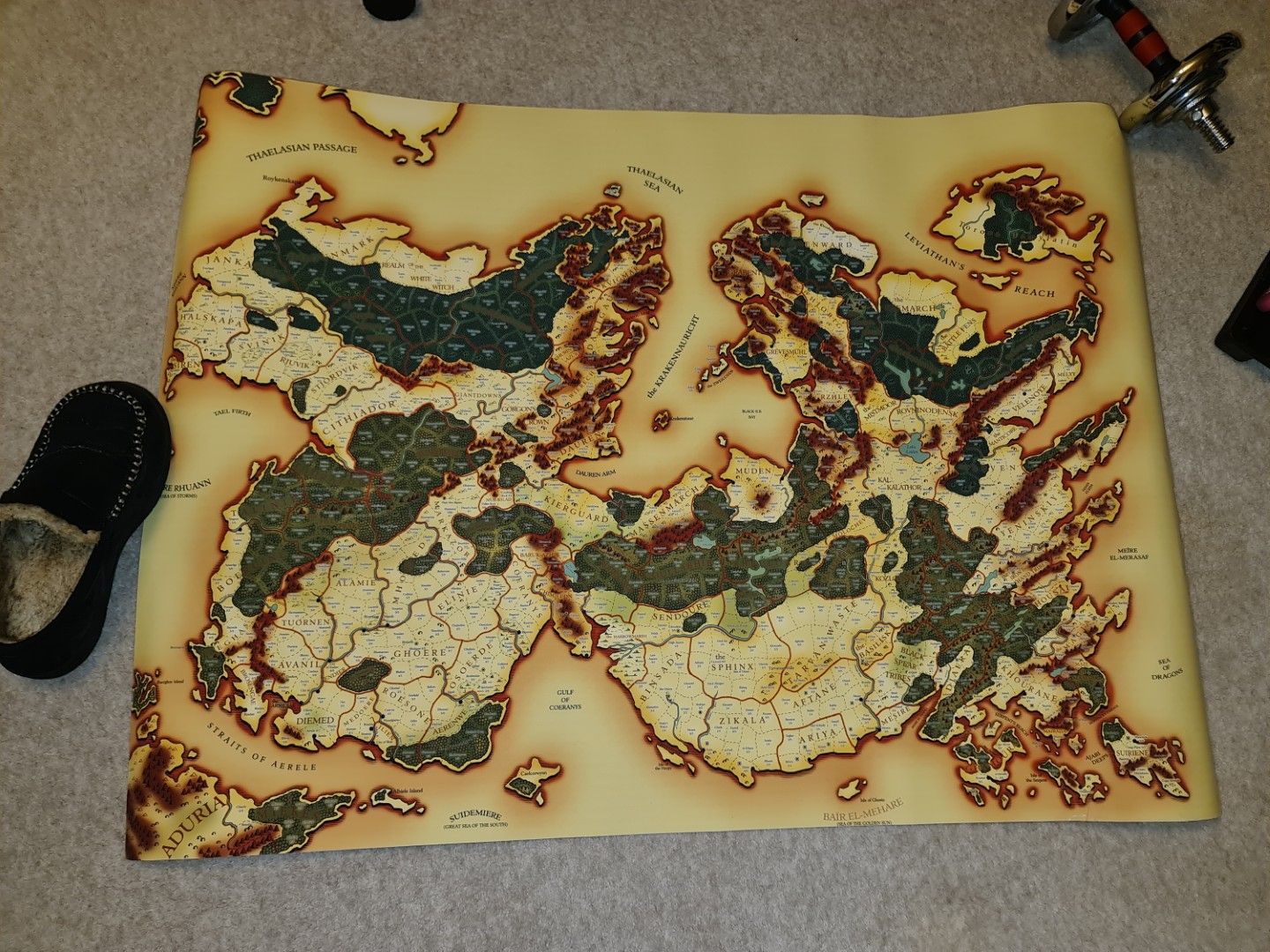
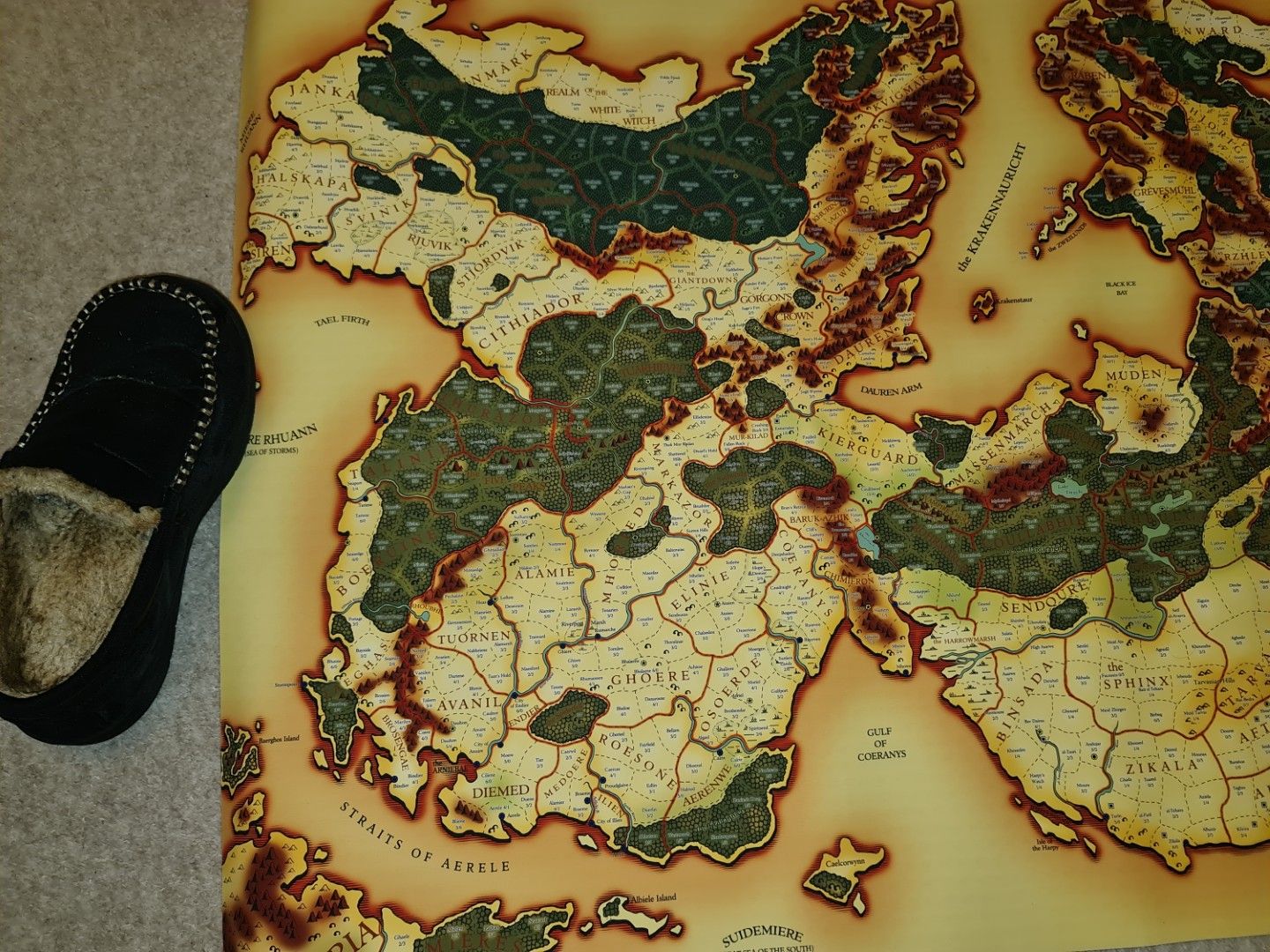
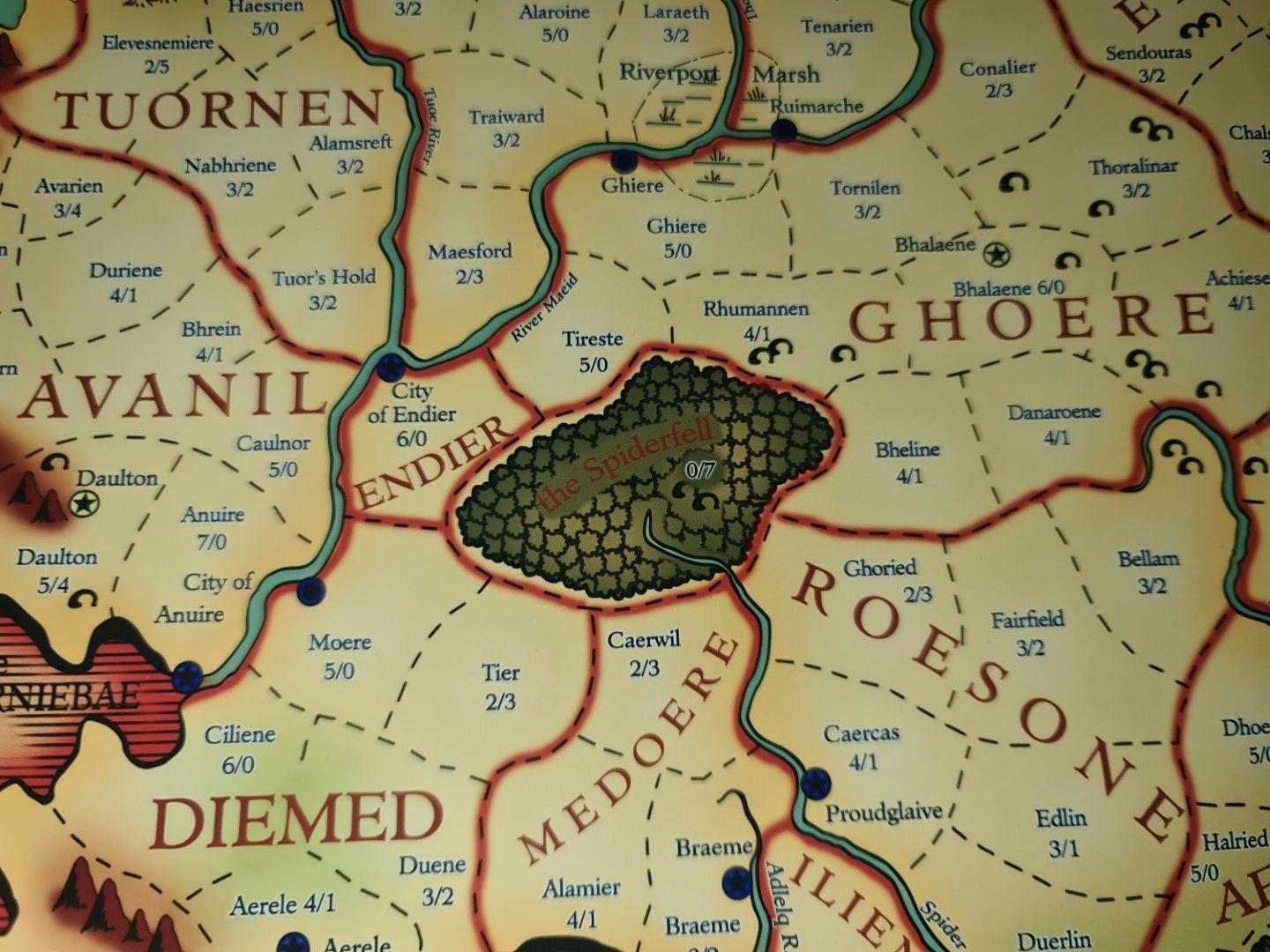
I did also get it printed at A1 (24 by 33 inches) and everything is still perfectly readable as long as the print service prints at a high enough dpi - and there's more than enough for them to work with at full res.
I just recently cancelled my photoshop subscription, but I'm sure I'll start it up again at some point in the future, and I'll see about fixing that mistake.
I'm so happy that it still gets looked at. Originally Posted by Fizz
-
Today, 04:19 AM #79Special Guest (Donor)
- Join Date
- Nov 2001
- Location
- southwest Ont Canada
- Posts
- 601
- Downloads
- 144
- Uploads
- 1
Those are standardized here too. So even with only 4 feet width, at that scale you can read the small names of the settlements of Thaele? Cool. Originally Posted by Silmaril.SE
What is that printed on- paper, canvas?
And i also noticed that another province of Grabentod is incorrect too- you have it as "Toothmarl", but it's acually "Toothmark". "l" vs "k". Again, a minor issue- maybe it's that way on the original map too- i've not checked (but the wiki says it's a k.)I just recently cancelled my photoshop subscription, but I'm sure I'll start it up again at some point in the future, and I'll see about fixing that mistake.
I've been playing around making a few tweaks using GIMP. I'm not a graphic designer by any stretch, and certainly not an expert with photoshop or gimp; i could never have created the base map you did. But with a few of the basic tools i've been making some edits and repairing inconsistencies.
These inconsistencies are not your doing, but the fault of the source material. In particular, HotGB has half of the provinces with parentheses, for example: "(5/2)" , while the rest do not: "5/2". So i've been removing those parentheses.
Another i've noticed: In Anuire, both the city and province are labelled when they have the same name. For example, "Aerele" is there twice, once to mark the province with levels, and again to mark the city of the same name. But in Khinasi, it looks like it's only named once. For example, in Binsada, Ber Dairas is both the province and capital, but there is only one label. I've not determined if there is reason for this, so haven't decided whether to do anything with those.
Before you told me what scale worked, i was paranoid about everything being legible. So i've also been working on making a couple items a bit more legible. Usually this just involves adding a fuzzy background around some text so things like trees or mountains don't interfere with letters.
Again, i want to emphasize that these edits i'm doing are minor compared to the whole work: you did the real work.
-FizzLast edited by Fizz; Today at 04:33 AM.
-
Today, 07:56 AM #80Junior Member
- Join Date
- Mar 2010
- Posts
- 24
- Downloads
- 12
- Uploads
- 0
Prints were on 180gsm paper.
Because I made the base image so stupidly large, theres a lot of scope for printing. At 300dpi, you could print it at 90 inches wide with perfect precision.
This is a close up of the map printed at A1 size - I think at 300dpi. Text legibility is still crisp. The only issue I think there is, and its made worse on camera, is the red/brown province names over the forrests. I think reducing the saturation of the green might help.
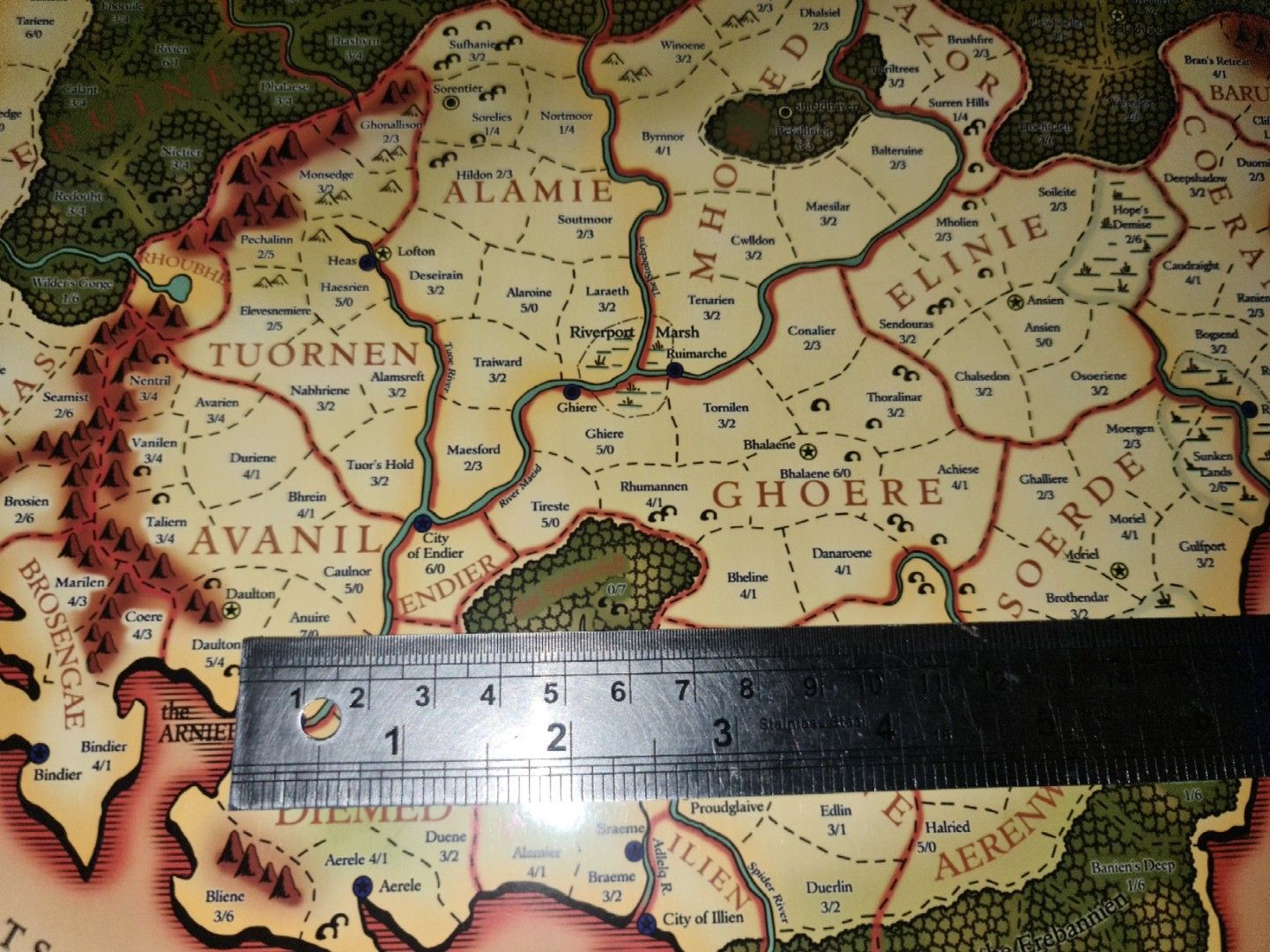
And don't worry about pointing out the mistakes! There were plenty A lot of them are from chosing to be as accurate to the original maps as possible - but some decisions had to be made when the source material wasn't clear, or was even at odds with itself!
Last edited by Silmaril.SE; Today at 08:00 AM.

 Reply With Quote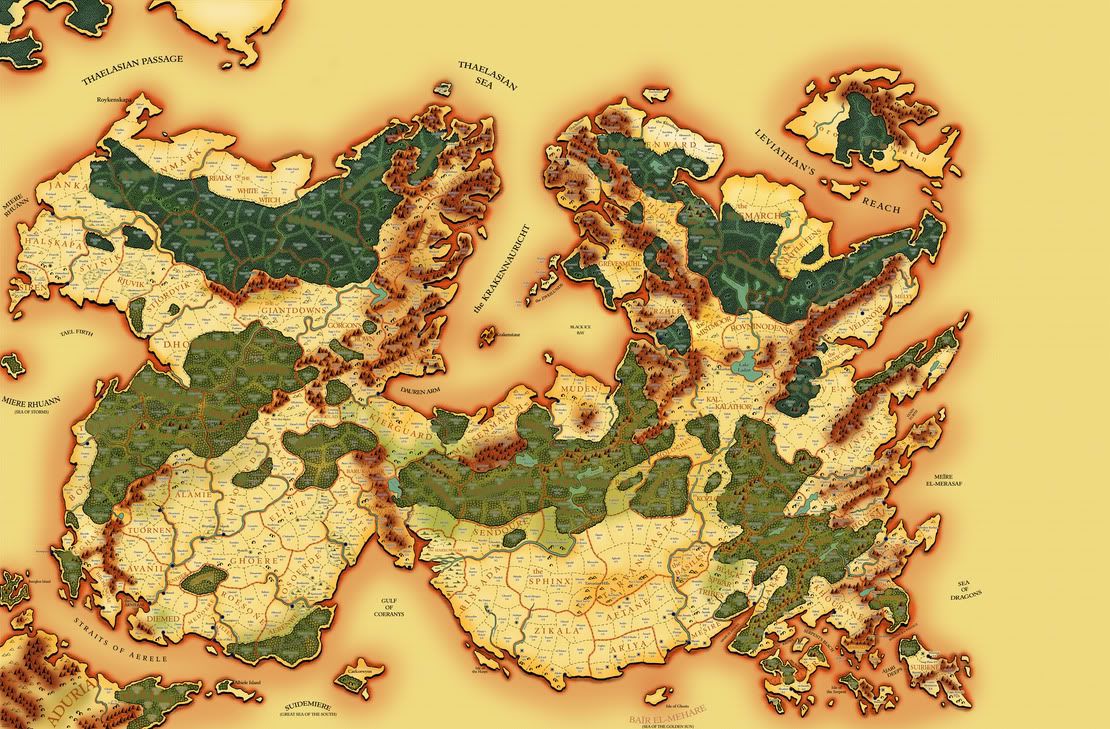
Thread Information
Users Browsing this Thread
There are currently 1 users browsing this thread. (0 members and 1 guests)
Similar Threads
-
Map Of Cerilia
By Bernardo in forum The Royal LibraryReplies: 7Last Post: 05-11-2010, 10:52 AM -
Cerilia
By Rey in forum MainReplies: 0Last Post: 05-21-2009, 09:04 AM -
Map of Cerilia
By nicolas1274 in forum Birthright.net supportReplies: 1Last Post: 12-01-2007, 05:17 PM -
Cerilia of Old/ko
By BadMiddle in forum MainReplies: 0Last Post: 06-25-2007, 09:57 PM -
Map Of Cerilia ?
By Ninqualda in forum The Royal LibraryReplies: 3Last Post: 10-01-2003, 05:27 PM


Bookmarks